
WordPress integration
Add Auripath to WordPress with a shortcode
Use the Auripath Embed Helper plugin to place hosted Auripath audio experiences inside WordPress pages, posts and landing pages without pasting longer embed code.

For WordPress users who prefer shortcodes.
How it works
- Create or publish your audio experience in Auripath.
- Copy the public document ID from your Auripath account.
- Install the Auripath Embed Helper plugin in WordPress.
- Add the shortcode to a page, post or shortcode block.
Shortcode example
Replace the example document ID with the public document ID from your Auripath account.
[auripath doc="doc_xxxxxxxxx"]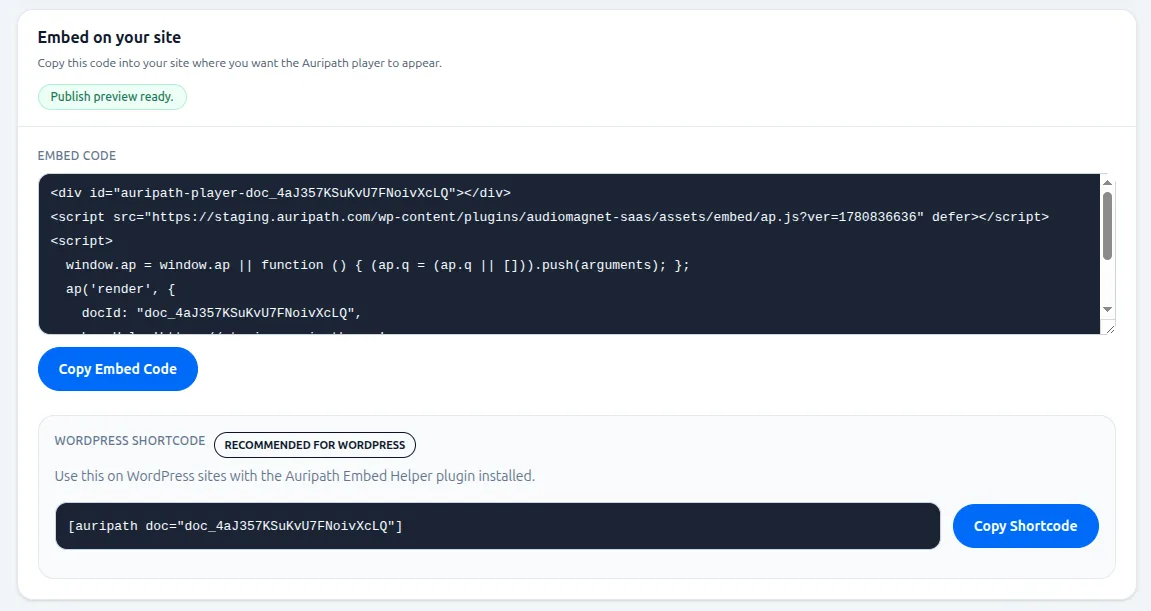
What the plugin does
Adds a simple shortcode
Use a familiar WordPress shortcode to render your hosted Auripath experience.
Loads the Auripath embed
The plugin loads the hosted Auripath embed script from the Auripath app.
Renders the player
Place the embedded player on WordPress pages, posts and campaign landing pages.
Keeps data in Auripath
Lead capture, CTAs, audio delivery and listening analytics stay handled by Auripath.
What it does not do
The plugin does not store leads, audio files or analytics data inside WordPress. It is a lightweight embed helper for placing hosted Auripath experiences on WordPress sites.
Useful for
- WordPress landing pages with embedded audio versions of guides or reports.
- Resource libraries where PDFs need a more accessible listening option.
- Campaign pages where you want lead capture and engagement analytics without rebuilding the page.
- Marketers who are comfortable with WordPress shortcodes but do not want to paste longer embed scripts.
Frequently asked questions
Can I embed Auripath on WordPress?
Yes. Auripath can be embedded on WordPress pages using the Auripath helper plugin, a shortcode or the normal embed script.
Do I need a custom WordPress theme?
No. Auripath is designed to work with normal WordPress sites. The embed sits inside an existing page rather than requiring a full theme rebuild.
Can I use Auripath with page builders?
Yes. In most cases, you can place the Auripath embed or shortcode inside a standard page builder HTML, shortcode or content block.
Will the player match my website branding?
Auripath is designed to support branded audio experiences, including player presentation and calls to action that fit the surrounding website.

Get the free audio ebook for better B2B follow-up.
Learn how to turn PDF downloads, listening behavior, and CTA clicks into stronger sales conversations.
