Turning a PDF into audio sounds simple until you ask a more useful question.
Not “can this PDF be read aloud?”
Most PDFs can be read aloud in some form.
The better question is:
Would someone actually want to listen to this?
That is where the quality of the PDF matters.
Some PDFs make strong audio experiences because they are written in a clear order, explain something useful, and help the listener understand a topic without needing to stare at a screen.
Other PDFs depend heavily on tables, diagrams, small print, complex layouts, or visual comparison. Those can still be adapted, but they usually need more editing before they work well as audio.
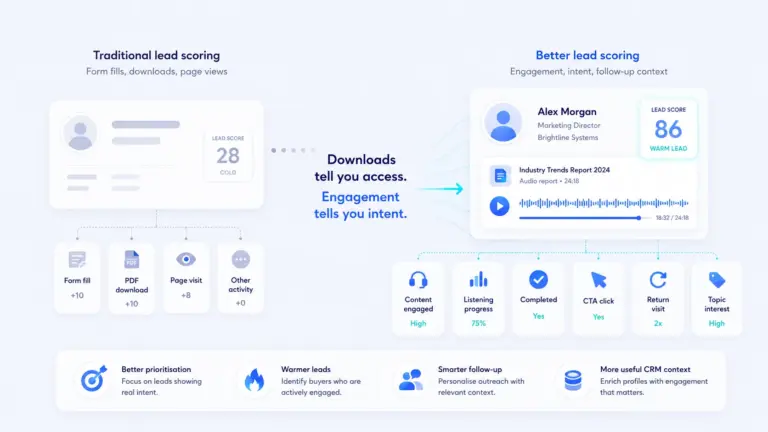
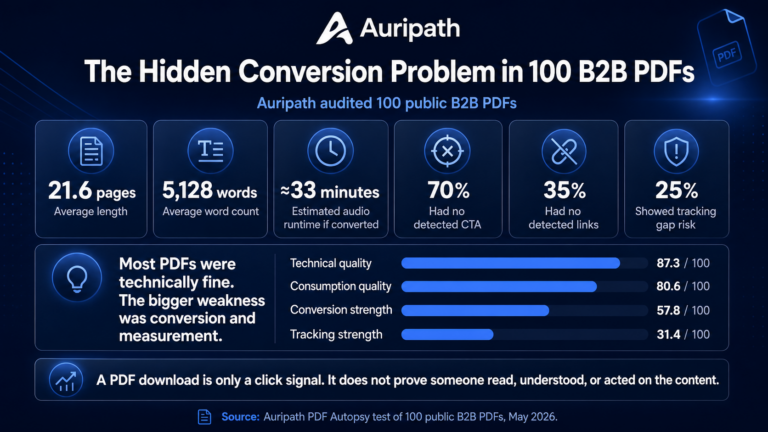
For B2B teams, this matters because many useful PDFs are never properly consumed. Ebooks, guides, reports, white papers, brochures, case studies and product PDFs often take time to produce, but once they are published, measurement usually stops at downloads, form fills or page views.
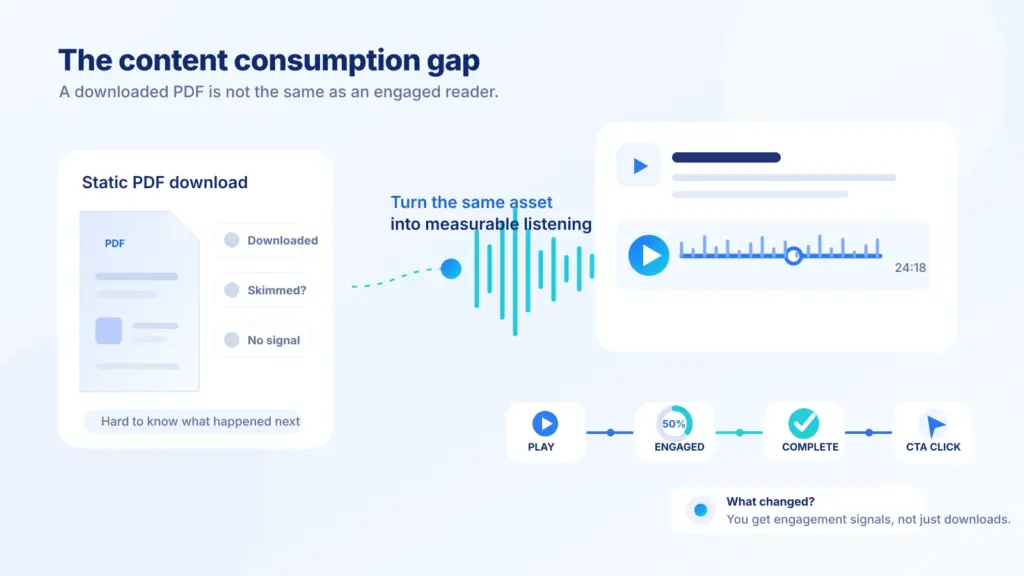
Tools such as Google Analytics can track GA4 file download events, but a download event still does not prove that someone read, understood or acted on the content.
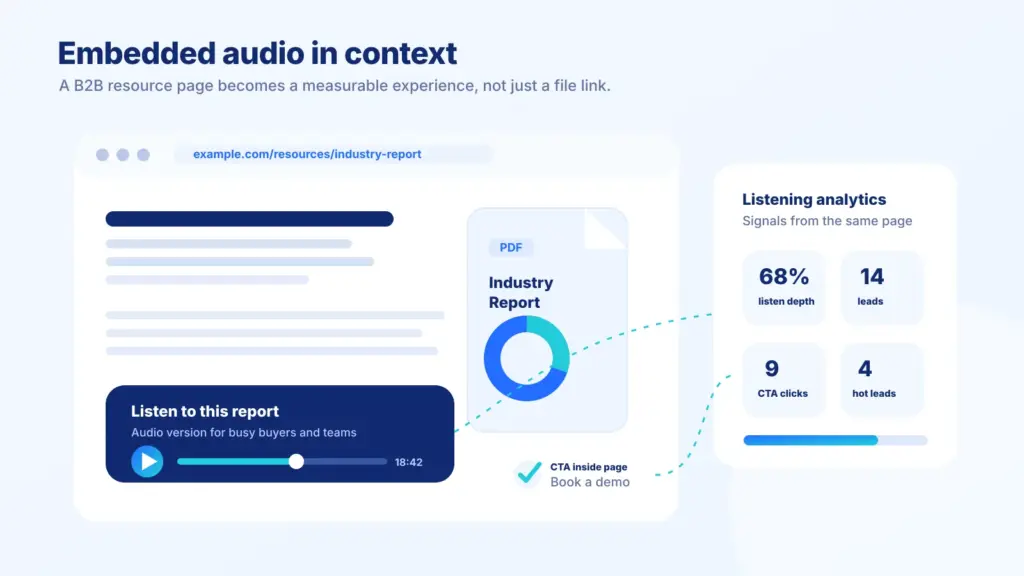
An audio version gives that same content another route into the buyer’s attention.
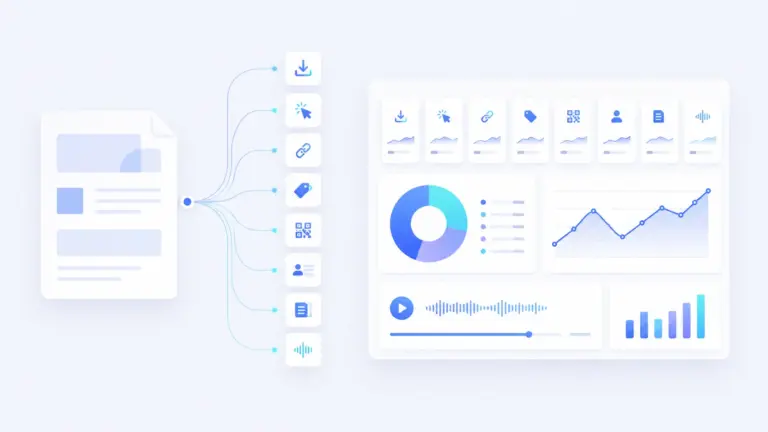
It also makes the content more measurable through listening analytics.
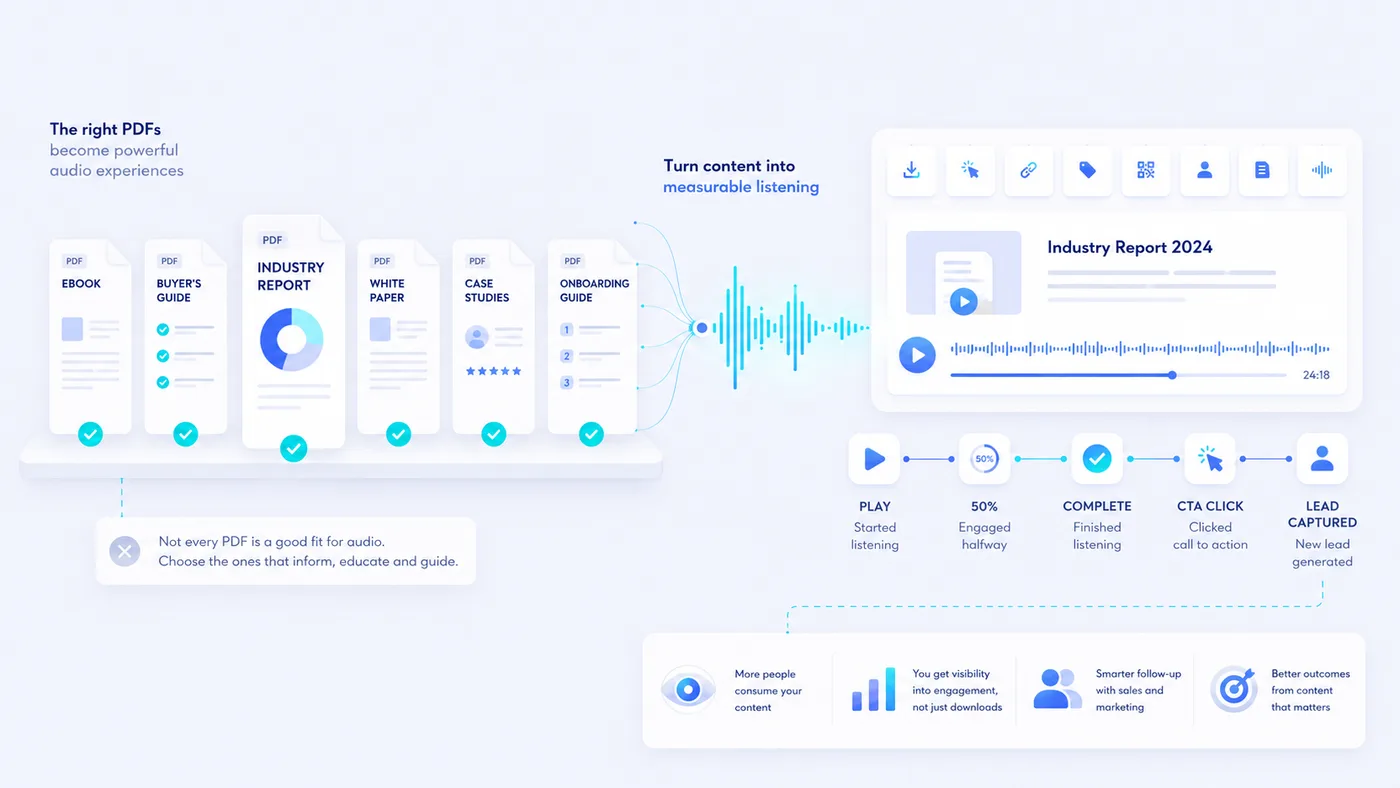
Instead of only asking whether someone downloaded a PDF, you can start asking whether they listened, how far they got, where they dropped off, and whether they clicked a call to action afterwards.
This guide explains the types of PDFs that usually work best as audio experiences, where audio is less suitable, and how to decide whether a PDF is worth converting.
What is a PDF audio experience?
A PDF audio experience is a listenable version of a PDF that is presented as a hosted or embedded audio player.
It is not just a raw text-to-speech file.
A useful audio experience usually includes:
- A clear title.
- A structured audio version of the PDF.
- Sections or chapters.
- A player that can be embedded on a website.
- Calls to action.
- Listening analytics.
- Optional lead capture.
- A way to connect listening behavior to marketing or sales follow-up.
This is different from traditional hosted document analytics, which usually focuses on document views, page activity and sharing. A PDF audio experience adds listening-specific signals such as plays, completion, drop-off and audio CTA clicks.
The PDF still exists. The audio version gives people another way to consume the same content.
That distinction is important.
The goal is not to replace every PDF. The goal is to make high-value PDF content easier to consume, easier to measure, and easier to use inside a B2B content journey.
Why some PDFs work better as audio than others
Audio works best when the content has a natural order.
A listener can only hear one thing at a time. They cannot quickly scan a table, compare three charts, or jump between footnotes in the same way they can on a page.
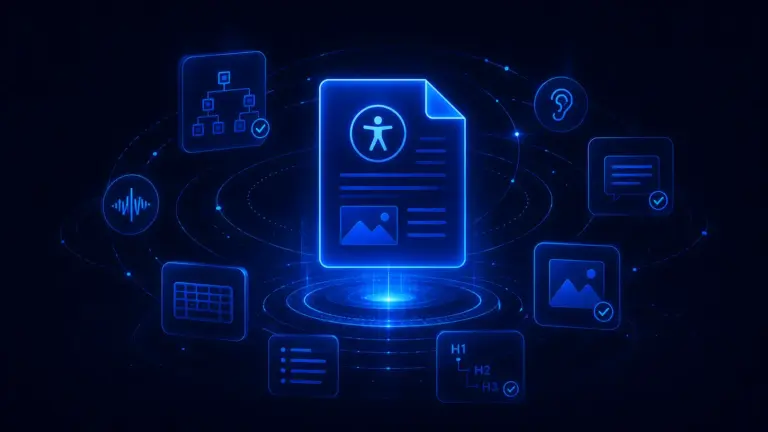
PDF structure matters here. Guidance from W3C on PDF reading order explains why logical order is important when PDF content is interpreted by assistive technology or read-aloud tools.
That means the best PDFs for audio tend to be:
- Text-led.
- Clearly structured.
- Written in sections.
- Useful without heavy visuals.
- Educational or explanatory.
- Long enough to justify listening.
- Connected to a meaningful next step.
The weakest PDFs for audio tend to be:
- Image-only scans.
- Dense catalogues.
- Spreadsheet-style reports.
- Forms.
- Legal documents full of cross-references.
- Technical manuals that rely on diagrams.
- Brochures where the design carries most of the meaning.
That does not mean those PDFs can never become audio. It means they may need adaptation first.
Adobe’s guidance on PDF accessibility and structure checks is also useful when preparing documents that need to be read, transformed or consumed in another format.
A good audio version is usually not created by reading every visible word on the page. It is created by turning the useful content into a clear listening journey.
PDF audio examples compared
| PDF type | How well it works as audio | Best for | Main limitation |
|---|---|---|---|
| B2B marketing ebook | Very strong | Education, trust building, content engagement | Needs clear sectioning |
| Buyer’s guide | Very strong | Consideration-stage prospects | Comparisons may need simplification |
| White paper | Strong | Explaining complex topics | Can become too dense if read unchanged |
| Industry report | Strong | Thought leadership and research content | Charts and tables need verbal summaries |
| Product guide | Strong | Explaining features, use cases and outcomes | Spec tables may not translate well |
| Case study collection | Strong | Proof, sales enablement, trust | Needs careful pacing to avoid repetition |
| Sales deck PDF | Mixed | High-intent sales follow-up | Often too slide-dependent |
| Onboarding guide | Strong | Customer education and adoption | Step-by-step tasks may need chapters |
| Event brochure | Mixed | Pre-event or post-event follow-up | Schedules and speaker lists can be awkward |
| Annual report | Mixed | Executive summary, highlights and narrative | Financial tables need adaptation |
| Policy or guidance PDF | Useful in some cases | Accessibility, internal comms, public information | Legal or compliance wording can be dry |
| Product catalogue | Weak | Only if curated into highlights | Too visual and list-heavy |
| Scanned PDF | Weak | Only after OCR and editing | Reading order and text quality often fail |
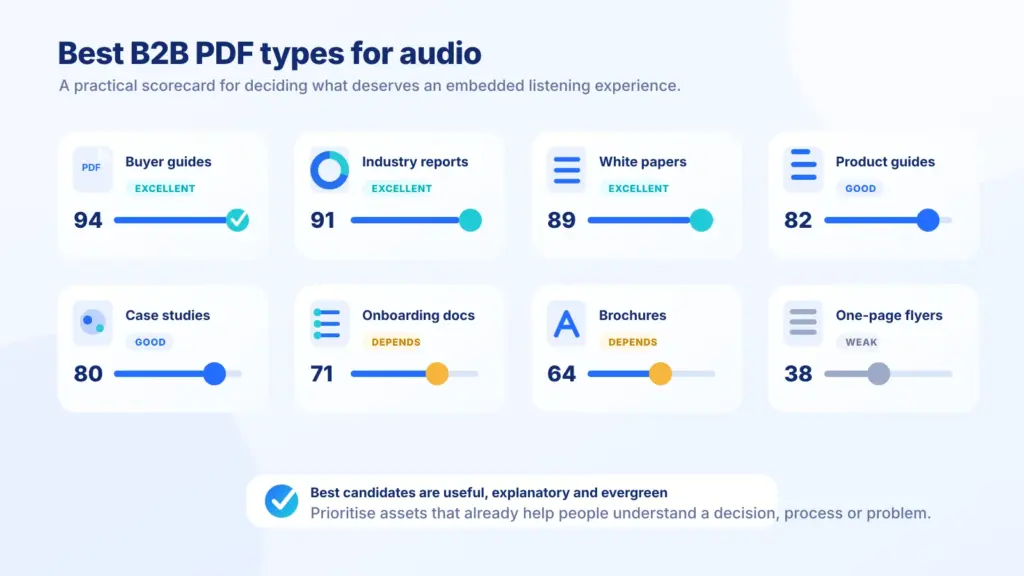
The pattern is simple.
If the PDF explains, teaches, persuades or guides, it may work well as audio.
If the PDF mostly displays, lists, compares or requires visual inspection, it usually needs more work.
1. B2B marketing ebooks
B2B marketing ebooks are one of the best candidates for audio.
They are usually written to educate a prospect before they are ready to talk to sales. They often explain a problem, frame a solution, give examples, and guide the reader toward a next step.
That makes them a natural fit for listening.
Why B2B ebooks work well as audio
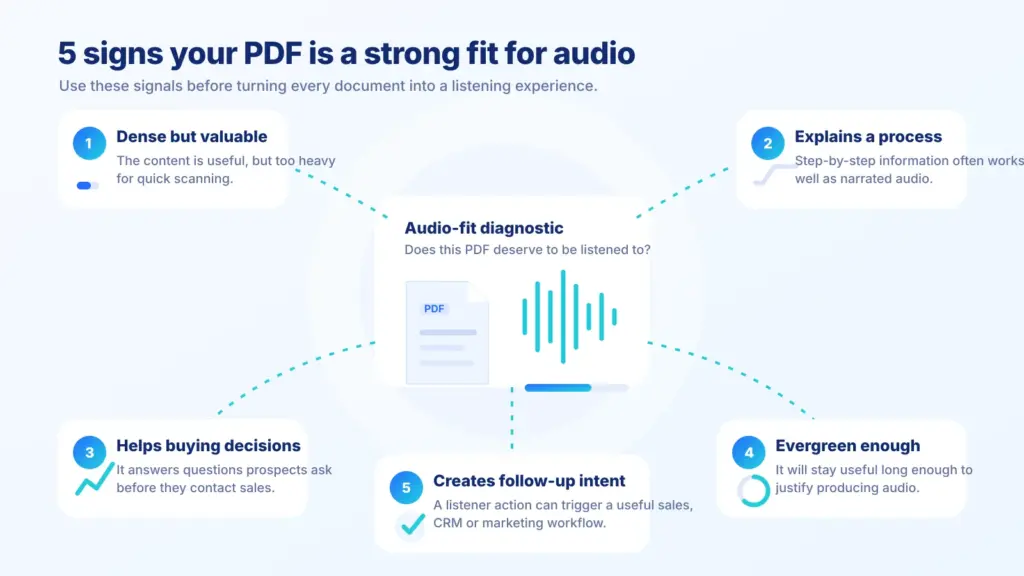
- They are usually text-led.
- They already have chapters or sections.
- They explain a topic in order.
- They are often too long for busy prospects to read in one sitting.
- They are connected to measurable actions, such as booking a demo, viewing a product page, or requesting more information.
- They are often used in campaigns where engagement matters.
The problem with many B2B ebooks is not that they are bad.
The problem is that they ask for too much attention.
Someone may download the ebook with good intentions, skim the first page, then leave it in a downloads folder forever. That does not mean the content failed. It may mean the format was asking for the wrong kind of attention at the wrong time.
An audio version gives that same person another way to consume it.
They can listen while doing admin, traveling, walking, sorting email, or working through other low-focus tasks.
Where this works best
- Practical guides.
- Problem awareness ebooks.
- Strategy guides.
- “How to choose” guides.
- Industry explainers.
- Educational content for prospects.
- Long-form website resources that were originally published as PDFs.
What to adapt
- Remove repetitive design text.
- Skip footer text, page numbers and decorative labels.
- Turn long lists into spoken summaries.
- Make section transitions clear.
- Add a short introduction explaining who the audio is for.
- Add a final call to action that fits the content.
Best use case: turning a high-value B2B ebook into an embedded audio experience on the same page where the PDF is promoted.
2. Buyer’s guides
Buyer’s guides are another strong fit for audio because they are already designed around decision-making.
A buyer’s guide usually helps someone understand options, compare approaches, avoid mistakes and decide what matters before they choose a vendor or solution.
That is useful listening content.
What buyer’s guides often include
- A problem overview.
- A list of buying criteria.
- Common mistakes.
- Feature comparisons.
- Questions to ask vendors.
- Implementation considerations.
- A final checklist.
- A call to action.
All of those can work well in audio if they are structured clearly.
The main issue is comparison.
A table with ten rows and six columns may work on the page, but it usually sounds awful when read aloud. In audio, the same information should be turned into a simple explanation.
For example, instead of reading a feature comparison table cell by cell, the audio version could say:
There are three main things to compare here: how the tool handles content, how it tracks engagement, and how easily it connects to the rest of your marketing stack.
That is much easier to follow.
What buyer’s guide audio can measure
- Plays.
- Completion.
- Drop-off before comparison sections.
- Repeat listens.
- CTA clicks.
- Whether people listen before submitting a sales inquiry.
- Which guide topics hold attention longest.
Best use case: consideration-stage content where the listener is already trying to understand a market, compare options or prepare for a purchase decision.
3. White papers
White papers can work well as audio, but they need care.
A good white paper explains a serious topic in a structured way. It may include research, argument, context, examples and recommendations.
That can make strong audio.
But many white papers are too dense to be read aloud without editing.
Common white paper problems
- Long sentences.
- Heavy jargon.
- Footnotes.
- Charts.
- Technical definitions.
- Abstract claims.
- Repeated executive language.
- Sections written more for approval than clarity.
That does not mean white papers are bad candidates. It means they need an audio-first pass.
A listenable white paper should feel like someone explaining the paper, not like someone reading the PDF file from top to bottom.
What to adapt
- Turn dense paragraphs into shorter spoken sections.
- Explain charts in plain English.
- Summarise footnotes rather than reading them.
- Move definitions closer to where they are needed.
- Break long sections into chapters.
- Add a short recap after complex parts.
Where white paper audio works well
- Technical B2B marketing.
- Research-led campaigns.
- Consulting firms.
- SaaS companies.
- Financial services.
- Healthcare and regulated industries.
- Engineering or infrastructure firms.
- Professional services.
Best use case: a serious thought leadership asset where the company wants more people to actually consume the argument, not just download the file.
4. Industry reports and benchmark reports
Industry reports are strong audio candidates when they have a clear story.
If you want a live public example of benchmark-style PDF findings presented around format fit and measurement, see the PDF Benchmark Report.
A report does not need to be entertaining. But it does need to have a journey.
For example:
- What changed this year?
- What surprised the researchers?
- What should the reader pay attention to?
- What does this mean for a specific industry?
- What should a business do next?
Those questions work well in audio.
The risky parts are usually data tables, charts and methodology sections.
A listener does not want to hear every number in a table. They want the conclusion, the trend and the implication.
How to adapt a report for audio
- Summarise tables.
- Describe charts as trends.
- Group statistics into themes.
- Move methodology into a short optional section.
- Use chapter markers for major findings.
- Add a “what this means” recap after each major section.
Good report sections for audio
- Executive summary.
- Key findings.
- Market overview.
- Trends.
- Risks.
- Recommendations.
- Industry implications.
- Practical next steps.
Weak report sections for audio
- Raw tables.
- Appendices.
- Survey methodology in full detail.
- Long lists of respondents.
- Dense citation sections.
- Legal disclaimers.
Best use case: turning a long report into a more accessible, measurable listening experience for prospects, customers, partners or internal teams.
5. Product guides and solution guides
Product guides can work well as audio when they explain use cases rather than just list features.
A feature list is not always good listening material.
But a guide that explains what a product does, who it is for, how it fits into a workflow, and what problems it solves can become useful audio.
Strong product guide content for audio
- Use cases.
- Problem and solution explanations.
- Customer scenarios.
- Implementation steps.
- Common questions.
- Integration explanations.
- Comparison with old workflows.
- Practical examples.
Weak product guide content for audio
- Long specification tables.
- SKU lists.
- Detailed pricing tables.
- Screenshots with no explanation.
- Interface instructions that rely on visuals.
- Feature grids.
A product guide audio experience can be useful when someone is researching a product but is not ready to speak to sales.
It can also help existing customers understand capabilities they missed during onboarding.
What to adapt
- Turn feature lists into use cases.
- Add spoken context before technical details.
- Use examples instead of reading interface labels.
- Summarise screenshots.
- Add calls to action at natural points, such as “view the product page” or “compare plans”.
Best use case: product-led B2B companies with useful guides that explain workflows, not just features.
6. Case study collections
Case studies often work well as audio because they already follow a story.
A basic case study usually has:
- The customer.
- The problem.
- The old way of working.
- The solution.
- The result.
- The lesson.
That is a natural audio structure.
A single short case study may not always need its own audio version. But a collection of case studies can work very well.
Best use case: proof content where you want prospects to hear real examples without forcing them to read a long PDF.
7. Sales enablement PDFs
Sales enablement PDFs are a mixed category.
Some are excellent for audio. Others are too visual or too internal.
Good candidates include:
- Sales follow-up guides.
- Solution explainers.
- Comparison guides.
- Proposal explainers.
- ROI explainers.
- Discovery summaries.
- Post-demo resource packs.
- Board-level summary documents.
Weaker candidates include:
- Slide decks with little text.
- Battlecards written for internal use.
- Feature grids.
- One-page leave-behinds that rely on layout.
- Highly personalized proposals with sensitive details.
Audio can be useful after a sales call when the prospect needs to share information internally.
For example, a sales team might send a written PDF and an audio version of the same key points. The champion inside the company can forward the page to colleagues who would never read the full PDF.
That can make the content easier to circulate.
It also creates useful engagement signals.
If someone listens to most of a proposal explainer, that may be more meaningful than simply knowing they opened an attachment.
Best use case: high-intent sales content where listening behavior could help sales understand interest and timing.
8. Customer education and onboarding guides
Customer education PDFs can make very useful audio experiences.
These are not always marketing assets. But they can still improve engagement, adoption and support.
Examples include:
- Getting started guides.
- Implementation guides.
- Training guides.
- Best practice documents.
- Customer success playbooks.
- Troubleshooting guides.
- Process explainers.
- Internal rollout documents.
These work well when the content teaches a process in a clear order.
Audio can be especially useful when the reader is doing something else at the same time. For example, they may be setting up a tool, preparing a team, learning a process or reviewing instructions before a meeting.
Best use case: long customer guides where adoption matters and where written PDFs are useful but not always consumed properly.
9. Event brochures and conference resources
Event PDFs can work as audio, but only when they contain more than a timetable.
A basic event schedule does not usually make great audio. Listening to room names, speaker times and session codes can be tedious.
But an event guide with useful context can work well.
Good event content for audio
- Event overview.
- Theme introduction.
- Speaker highlights.
- Session summaries.
- Sponsor explainers.
- Pre-event briefings.
- Post-event summaries.
- Practical “what to attend” guides.
- Follow-up resource packs.
Weak event content for audio
- Full schedules.
- Venue maps.
- Badge collection instructions.
- Sponsor logo pages.
- Long exhibitor lists.
- Terms and conditions.
Audio can be useful before and after an event.
Before the event, it can help people understand what the event is about and which sessions matter.
After the event, it can help turn the PDF into a follow-up resource instead of letting it disappear once the event ends.
Best use case: event content that explains the themes, sessions and takeaways rather than just listing logistics.
10. Executive summaries and business reports
Executive summaries can work very well as audio because they are already designed for people with limited time.
A good executive summary says:
- Here is what changed.
- Here is what matters.
- Here is what we recommend.
- Here is what to do next.
That is ideal for audio.
This can apply to:
- Annual report summaries.
- Board report summaries.
- Strategy documents.
- Market updates.
- Quarterly reviews.
- Research summaries.
- Consulting reports.
- Campaign performance reports.
The full report may be too dense for audio. But the summary can be excellent.
Best use case: senior audience content where the reader may not have time to read the full document but still needs to understand the main points.
11. Public guidance, policies and internal resources
Not every audio PDF has to be a marketing asset.
Guidance documents, policy PDFs and internal resources can also work well as audio, especially when accessibility and comprehension matter.
Examples include:
- Public guidance documents.
- HR policies.
- Employee handbooks.
- Safety information.
- Member guides.
- Community information.
- Charity resources.
- Local authority guides.
- Healthcare information.
- Training documents.
A good approach is to separate the official document from the audio guide.
The PDF remains the official written version. The audio version helps people understand the main information.
Best use case: important documents where understanding and accessibility matter, but where the original PDF may be hard to read in one sitting.
Which PDFs do not work well as audio?
Some PDFs are poor candidates for audio unless they are heavily adapted.
That does not mean they are useless. It means audio may not be the best first format.
Weak candidates include:
- Scanned PDFs with poor OCR.
- Catalogues with hundreds of products.
- Price lists.
- Technical drawings.
- Forms.
- Legal contracts.
- Slide decks with very little text.
- Financial statements full of tables.
- Manuals that rely heavily on diagrams.
- Brochures where most meaning comes from layout and imagery.
The practical rule is this:
If the PDF needs eyes on the page to make sense, it needs adaptation before it becomes audio.
A practical checklist for choosing PDFs to turn into audio
Before turning a PDF into an audio experience, check the following:
- Is the PDF useful enough to justify another format?
- Is it text-led rather than mostly visual?
- Does it have a clear structure?
- Would someone reasonably listen to it while doing something else?
- Is it longer than a basic web page?
- Does it explain, teach, persuade or guide?
- Are there natural sections or chapters?
- Can charts and tables be summarised clearly?
- Are there clear calls to action?
- Would listening analytics tell you something useful?
- Is the PDF connected to a campaign, product, sales journey or customer journey?
- Could the audio version be embedded on a relevant web page?
- Would the audio version make the content easier to consume?
- Would the audio version help sales or marketing follow up more intelligently?
If you want a quicker fit check before converting anything, run a PDF Autopsy to review clarity, CTA strength, tracking gaps, mobile readability and audio opportunity.
You can also score each PDF quickly.
| Audio fit | Why | Recommended treatment | |
|---|---|---|---|
| B2B ebook | High | Clear chapters and educational content | Full audio version with chapters |
| Buyer’s guide | High | Helps prospects compare options | Full audio version with simplified comparisons |
| Research report | Medium to high | Strong insights but data-heavy | Audio summary plus key findings |
| Product brochure | Medium | Useful but visual | Short audio guide, not full reading |
| Sales deck | Medium | Useful if explained | Narrated version or summary |
| Catalogue | Low | Too list-heavy | Category overview only |
| Legal PDF | Low | Requires exact wording | Summary only if carefully reviewed |
Common mistakes when turning PDFs into audio
- Reading every word exactly as it appears on the page.
- Ignoring reading order problems in the PDF.
- Including page numbers, footers, disclaimers and decorative text in the audio.
- Reading long tables without summarising them.
- Treating a visual brochure like a script.
- Using one long audio file with no sections.
- Failing to add a clear introduction.
- Failing to explain who the audio is for.
- Making the audio too long without giving people a reason to continue.
- Removing too much detail from technical content.
- Forgetting to include a call to action.
- Publishing the audio without tracking plays, completion, drop-off or CTA clicks.
- Hiding the audio away instead of embedding it near the original PDF or related content.
- Assuming downloads are the same as consumption.
The biggest mistake is treating audio as a file conversion job.
For B2B content, it is better to treat audio as a content experience.
The PDF is the source. The audio version is the listener-friendly version. The player, CTA and analytics are what make it useful for marketing and sales.
Conclusion: the best audio PDFs are useful, structured and measurable
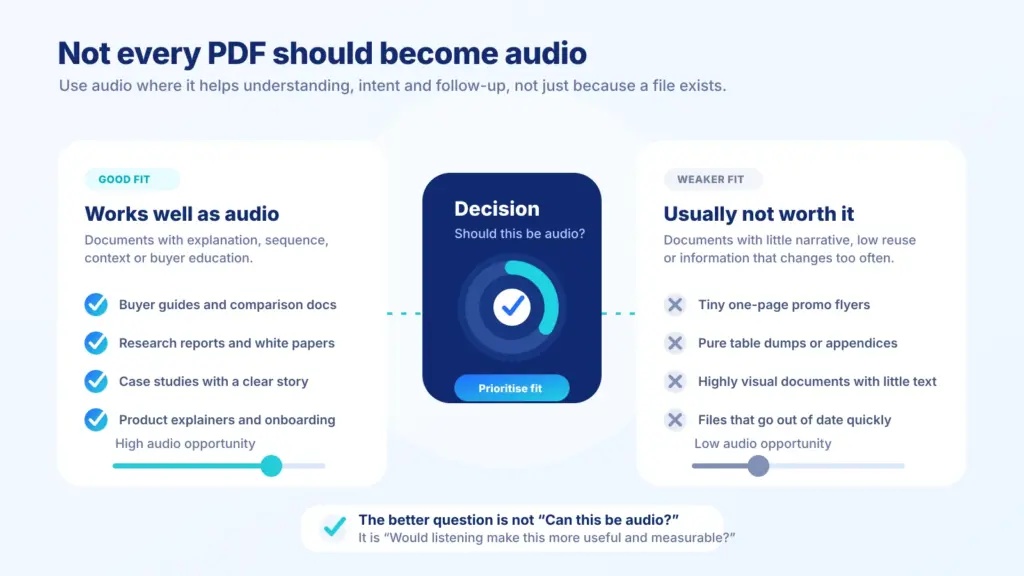
Not every PDF should become an audio experience.
The best candidates are PDFs that already contain useful, structured, text-led content.
B2B marketing ebooks, buyer’s guides, white papers, reports, case study collections, product guides and customer education documents are usually strong candidates. They explain ideas, support decisions and ask for more attention than a normal web page.
Audio gives those assets another route into the buyer’s attention.
It also makes the content more measurable.
A normal PDF can tell you that someone clicked, downloaded or filled in a form. A hosted audio experience can show whether someone started listening, how far they got, where they dropped off and whether they clicked a call to action.
That does not replace the PDF.
It adds a second layer.
If your PDF is short, visual or mostly decorative, audio may not be worth it. If your PDF teaches, explains, persuades or supports a buying decision, it may be one of the best assets to turn into audio.
The practical test is simple.
If the PDF contains something your buyer should understand, but probably will not sit and read properly, it is worth considering an audio version.
If you already have a B2B ebook, guide, report or white paper, Auripath can turn it into an embedded audio experience with listening analytics, calls to action and lead capture.
Related reading
Frequently asked questions
What types of B2B PDFs work best as audio experiences?
The best fit is usually useful, structured and educational content: buyer guides, industry reports, white papers, ebooks, case studies, product guides and onboarding documents. These documents already explain something valuable, so audio gives people another way to consume them.
Do B2B ebooks work well as audio?
Yes. B2B ebooks are often one of the strongest candidates because they are long enough to benefit from a listening format and usually have clear commercial intent. Audio can make them easier to consume while giving marketing and sales teams better engagement signals.
Should every PDF be turned into audio?
No. Short flyers, highly visual documents, dense table-only PDFs and documents that change constantly are usually weaker fits. Audio works best when the PDF has a clear narrative, useful explanation or decision-supporting content.
Is PDF-to-audio just text-to-speech?
Not if it is done properly. Basic text-to-speech only reads the words out loud. A stronger audio experience should consider structure, sectioning, pacing, clarity, calls to action, lead capture and analytics.
Do I need to replace the original PDF?
No. In most cases, the PDF should stay available. Audio works best as an additional consumption option on the same resource page, so visitors can read, listen or do both.
Where should the audio version be placed?
Usually near the original PDF or on the same resource landing page. For example, a B2B ebook page can include a short introduction, an embedded audio player, a PDF link and a relevant call to action.
Can audio analytics show whether someone read the PDF?
Audio analytics measure engagement with the audio experience, not the raw PDF itself. But they can show useful intent signals, such as who started listening, how far they got and whether they clicked a call to action afterwards.
How long should a B2B audio version be?
It depends on the document. A short brochure might only need a few minutes, while a longer ebook or guide may need multiple sections. For complex or useful B2B content, a more structured audio version usually works better than one long uninterrupted track.

Get the free audio ebook for better B2B follow-up.
Learn how to turn PDF downloads, listening behavior, and CTA clicks into stronger sales conversations.